

What Is a Riser Desk? Its Meaning, Types, and Real Benefits
A riser desk is a height-adjustable platform that sits on top of your existing desk. In short, it lifts your monitor, keyboard, and mouse to a standing-friendly height, so you can switch between sitting and standing without buying an entirely new desk. If your back has been sending polite little warning signals every afternoon, a riser desk is usually the first upgrade people research, and this “what is a riser desk” guide covers everything you need to know before you buy one.
Below, you will find a clear breakdown of what a riser desk actually is, how it works, the different types available, the honest benefits and downsides, and how it compares to a full standing desk. Along the way, we will also look at real research on sitting versus standing, so that you are making a decision based on facts rather than marketing claims. By the end, you should know exactly whether this small upgrade is worth adding to your workspace.
Table of Contents
- How Does a Riser Desk Work?
- Types of Riser Desks
- Weight Capacity: What Your Riser Desk Needs to Support
- Key Benefits of a Riser Desk
- Riser Desks and Laptop-Only Setups: What to Know
- Downsides Worth Knowing Before You Buy
- 8 Research-Backed Facts About Sitting and Standing at Work
- Riser Desk vs. Standing Desk: A Side-by-Side Comparison
- Who Should Choose a Riser Desk?
- Who Should Consider a Full Standing Desk Instead?
- Desk Riser or Riser Desk: Are They the Same Thing?
- Getting Your Riser Desk Out of the Box and Ready to Use
- How to Set Up Your Riser Desk Correctly
- Common Mistakes People Make With a Riser Desk
- Keeping Your Setup Tidy Once the Riser Is in Place
- A Quick Buying Checklist
- How Much Does a Riser Desk Really Cost?
- What Affects a Riser Desk’s Long-Term Durability
- Real-World Scenarios: Which Riser Desk Fits You?
- Frequently Asked Questions
- What does a riser desk actually do?
- Are riser desks worth the money?
- How high should a riser desk sit?
- Are riser desks good for back pain?
- Can a riser desk fully replace a standing desk?
- Do riser desks work with any desk?
- How long does a riser desk typically last?
- Final Thoughts
What Is a Riser Desk?
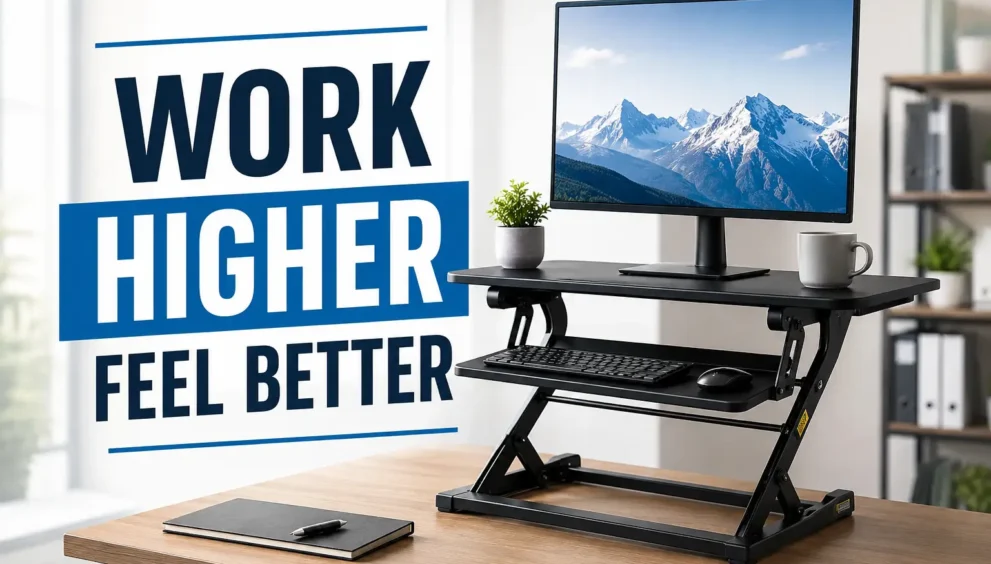
A riser desk, also called a desk riser or a standing desk converter, is an add-on device rather than a full desk replacement. It sits directly on your current desk and raises a section of your workspace to standing height, without requiring you to move a single drawer.
Here is what typically makes up a riser desk:
- A top platform that holds your monitor or laptop at eye level
- A lower tray that holds your keyboard and mouse at a comfortable typing height
- A lifting mechanism, such as gas springs, a manual lever, a hand crank, or an electric motor
- A base or clamp that keeps the unit stable on your existing desk
Unlike a full standing desk, which replaces your entire desk and moves the whole tabletop up and down, a riser desk only lifts the platform it sits on. As a result, your drawers, your desk lamp, and the rest of your furniture stay exactly where they are. Meanwhile, you gain the flexibility to stand whenever your body asks for a change.
For anyone who likes the idea of standing more during the day but is not ready for a complete furniture overhaul, this distinction matters quite a bit, and it is often the deciding factor between the two options.
How Does a Riser Desk Work?
Once you understand the basic meaning, the next logical question is how the mechanism actually functions. In general, a riser desk has a platform that moves up and down, and the method behind that movement depends entirely on the type you choose.
- Gas spring, or pneumatic, risers: You squeeze a lever, and a pressurized cylinder smoothly lifts or lowers the platform. This is the most common type because it needs no electricity and adjusts within seconds, which makes it convenient for quick position changes.
- Manual lever risers: These rely on a mechanical system instead of gas pressure. They tend to be the most affordable option, though they require a bit more physical effort to adjust each time.
- Crank risers: A hand-turned handle raises or lowers the surface, similar to rolling down an old car window. They move more slowly than other types, but in exchange, they allow for very precise height control.
- Electric risers: A simple button press raises or lowers the platform automatically. This is the most convenient option, especially for anyone who changes position often throughout the day. However, this convenience comes at a higher price, and it also requires a nearby power outlet.
Regardless of the mechanism you choose, most riser desks include two tiers. Consequently, your monitor and your keyboard stay at properly separated heights, which turns out to be one of the most important details in the entire ergonomic setup. Without this separation, one of the two surfaces almost always ends up at an uncomfortable angle.
Types of Riser Desks
Not every riser desk on the market looks or performs the same way. Picking the wrong type is one of the most common regrets buyers mention afterward, so the table below breaks down the main options available today.
| Type | Best For | Key Advantage | Main Limitation |
|---|---|---|---|
| Single-tier riser | Laptop-only users, tight budgets | Lightweight and portable | No separate keyboard tray |
| Dual-tier riser | Most home and office users | Proper monitor and keyboard height separation | Slightly larger footprint |
| Full-width riser | Multi-monitor setups | Extra surface area | Takes up more desk space |
| Compact riser | Shared or small desks | Small footprint | Limited weight capacity |
| Motorized riser | Daily, heavy-use setups | One-touch presets | Highest price point |
For most users, a dual-tier riser offers the best overall balance between comfort, price, and stability. That said, your final choice should ultimately depend on your desk size, your monitor setup, and how often you plan to switch between sitting and standing throughout the day.
Weight Capacity: What Your Riser Desk Needs to Support
Not every riser platform is built to carry the same load, and this is where a lot of buyers run into trouble after the fact. A single-tier riser might comfortably hold a laptop, but the moment you add a second monitor or a monitor arm, that same platform can start to feel unstable.
As a rough guide, here is what most riser types are rated for:
- Single-tier riser: 15 to 25 lbs on the top platform
- Dual-tier riser: 20 to 35 lbs on top, 10 to 15 lbs on the keyboard tray
- Full-width or motorized riser: 35 to 66 lbs, depending on the model
Since the actual weight your setup demands depends on your exact monitor, arm, and accessory combination, it is worth working through the full weight capacity breakdown before finalizing your purchase, especially if you are running more than one screen.
Key Benefits of a Riser Desk
Human bodies were never really built to sit still for eight hours straight, yet that is exactly what most office jobs demand. As a result, a well-chosen riser desk can offer several genuine, evidence-backed benefits that go beyond simple comfort.
- More natural movement throughout the day, since standing rarely means staying completely still
- Better posture, because a properly positioned monitor stops you from leaning forward to see it
- Reduced neck and shoulder strain, which is often where desk-related pain starts first
- A steadier afternoon energy level, thanks to improved blood flow while standing
- A lower price point compared to a full standing desk, generally between 150 and 400 dollars
- No need to replace your current desk, so you keep the furniture you already own and like
Together, these benefits explain why riser desks have become such a popular entry point for people curious about the sit-stand lifestyle without committing to a full desk replacement right away.
Riser Desks and Laptop-Only Setups: What to Know
As the earlier comparison table pointed out, single-tier risers tend to be the natural fit for laptop-only users. Still, that pairing comes with a few practical details worth understanding before you buy. A laptop does not need a separate keyboard tray the way a full monitor-and-keyboard setup does, which changes what type of riser actually makes sense for you.
That said, laptop screens sit lower and closer than external monitors by design, so achieving proper eye-level height often takes a slightly different approach than the standard setup instructions assume.
Since laptop setups have their own considerations around screen height, keyboard use, and riser type, it is worth reading through the full guide on using a riser desk with a laptop before assuming the general setup advice applies exactly the same way.
Downsides Worth Knowing Before You Buy
Most articles stop right after listing the benefits, but a fair decision needs both sides of the story. Therefore, here are the honest downsides that often get left out of the conversation.
- Reduced usable desk space, since the riser takes up part of your existing surface
- Possible wobbling at full height, especially with cheaper, single-tier models
- A more limited height range compared to a full standing desk
- Trickier accessory compatibility, since monitor arms and cable trays are usually built for flat desks
- Extra reaching, since items placed on the lower desk surface can be harder to grab once the riser is raised
None of these downsides automatically make a riser desk a poor choice. Instead, they simply mean the product fits certain situations better than others, so it is worth weighing them against your own daily habits before deciding.
8 Research-Backed Facts About Sitting and Standing at Work
To make this decision easier, here are eight facts drawn from workplace health research. Each one helps explain why so many people are moving toward sit-stand setups in the first place, rather than treating it as a passing trend.
Long stretches of sitting have been linked in cardiovascular research to a higher risk of heart-related health issues, according to findings published in a major 2015 heart health journal study.
A large 2018 medical meta-analysis found that longer daily sitting time correlates with a higher overall mortality risk, regardless of a person’s exercise habits outside of work.
Standing burns noticeably more calories per hour than sitting, with some estimates placing the difference at roughly 50 to 100 extra calories per hour of standing.
Standing after meals has been associated with smaller blood sugar spikes compared to remaining seated, which may particularly benefit people managing insulin sensitivity.
Sedentary behavior researchers generally recommend breaking up sitting time every 20 to 30 minutes with at least a few minutes of standing or light movement.
The average adult spends somewhere between 11 and 13 hours a day sitting once work, commuting, and evening screen time are all combined together.
Most riser desks support between roughly 22 and 44 pounds of equipment, while heavier-duty or electric models can typically handle 66 pounds or more.
Properly adjusted monitor height, specifically at or slightly below eye level, is consistently cited by ergonomics researchers as one of the simplest ways which starts with getting your riser desk height dialed in correctly to reduce neck strain.
In short, the research consistently points in one direction: regularly alternating between sitting and standing supports better long-term health outcomes than staying seated all day, every day.
Riser Desk vs. Standing Desk: A Side-by-Side Comparison
This is often the point where people realize they were asking the wrong question all along. The real decision is not simply “what is a riser desk,” but rather, “does a riser desk or a full standing desk fit my situation better?” The table below lays out the comparison clearly, so you can see the trade-offs at a glance.
| Feature | Riser Desk | Full Standing Desk |
|---|---|---|
| What it is | An add-on platform for your current desk | A complete replacement for your desk |
| Work surface | Limited to the riser platform | Full desk surface at any height |
| Setup time | Minutes, with no tools required | Assembly required |
| Typical cost | $150 to $400 | $400 to $1,200 or more |
| Accessory compatibility | Limited | Full support for monitor arms and cable trays |
| Stability | Fine for light use, though it can wobble at full height | Solid and steady at any height |
| Best suited for | Renters, budget shoppers, first-time users | Long-term daily use and full ergonomic setups |
Ultimately, the core trade-off comes down to this: a riser desk gives you a fast and affordable way to try standing while working, but only your monitor and keyboard area actually move. A full standing desk, on the other hand, lifts everything together, which creates a smoother and more unified experience for anyone who spends most of the day working at a desk.
Who Should Choose a Riser Desk?
A riser desk tends to be the right fit if any of the following describe your situation, especially if you’re weighing it for a riser desk for home office setup:
- You rent your space and cannot swap out furniture without permission
- You want to test whether standing while working actually suits you first
- Your current desk holds sentimental or practical value you are not ready to give up
- You mainly plan to stand for lighter tasks, such as calls or checking email
Who Should Consider a Full Standing Desk Instead?
On the other hand, a full standing desk usually makes more sense if:
- You spend six or more hours a day at your desk
- You run multiple monitors or rely on accessories like monitor arms
- You want your entire desk surface to move together, not just part of it
- You are setting up a long-term home office rather than testing a short-term option
- You care about a clean, unified look rather than a desk stacked on top of a desk
Desk Riser or Riser Desk: Are They the Same Thing?
This small mix-up trips up a surprising number of shoppers. Generally speaking, “desk riser,” “riser desk,” and “standing desk converter” describe the same product category, and brands frequently use these terms interchangeably across listings. However, a few retailers use “riser desk” to describe a full height-adjustable desk instead of a simple converter, so the terminology is not perfectly standardized across the market.
For that reason, always check the actual product description rather than relying on the name alone before buying, since a mismatch here can lead to returning the wrong product entirely.
Getting Your Riser Desk Out of the Box and Ready to Use
Once you have chosen the right type and confirmed it can handle your setup, the next step is putting it together correctly. Most riser desks arrive mostly pre-assembled, but a few small missteps during setup, like unevenly tightened brackets or a keyboard tray that is not fully locked in, are usually what cause the wobbling people mistake for a product defect later.
The general process stays fairly consistent across gas spring, crank, and electric models: unboxing and checking parts, attaching the base to the lifting mechanism, mounting the platform, and running a full range test before adding any equipment.
Since getting each of these steps right the first time saves you from having to disassemble and redo it later, it is worth following a proper step-by-step assembly guide rather than relying on the included manual alone.
How to Set Up Your Riser Desk Correctly
Buying the right riser desk only solves half the problem. Setting up a riser desk properly is what actually delivers the ergonomic benefits, so follow these steps carefully rather than rushing through them.
- Set your monitor height first. The top of your screen should sit at or just slightly below eye level, keeping your neck in a neutral position throughout the day.
- Position your keyboard next. Your elbows should rest close to a 90-degree angle, with your wrists flat rather than bent upward while typing.
- Check your standing posture. Distribute your weight evenly with your feet roughly shoulder-width apart, and avoid locking your knees for long periods.
- Ease into a sitting-to-standing rhythm. Start with shorter standing intervals, then gradually build up to 20 or 30 minutes per hour as your body adjusts.
- Add an anti-fatigue mat. This small addition noticeably reduces leg fatigue during longer standing sessions and is well worth the modest cost.
Common Mistakes People Make With a Riser Desk
Even with the right model, many users still end up uncomfortable in the first week. Usually, the setup is the problem, not the product itself, so it helps to know what to avoid in advance.
- Skipping the keyboard tray adjustment, which quickly leads to wrist strain over time
- Standing for too long, too soon, instead of building up gradually like any new habit
- Ignoring monitor distance, not just height, which causes squinting or forward leaning
- Choosing a model based on price alone, which often leads to a wobbly, short-lived purchase
- Forgetting to measure the desk first, which can cause the riser to overhang the edge unsafely
Keeping Your Setup Tidy Once the Riser Is in Place
Even after a smooth setup, most people run into one problem within the first week: cables. Between your monitor, keyboard, mouse, and any additional accessories, a riser desk adds height to your workspace, which means loose cords now stretch across a moving platform instead of lying flat against your desk.
Left unmanaged, this creates two separate issues. First, cables can catch on the riser as you adjust its height, which is both annoying and a genuine strain on the wiring over time. Second, a cluttered platform quietly undoes a lot of the clean, ergonomic feel that made the upgrade worth it in the first place.
A few simple habits, like routing cables through a clip or sleeve and leaving slack for height changes, go a long way here. For a complete approach to keeping cords organized around a moving platform, the dedicated cable management guide walks through it step by step.
A Quick Buying Checklist
Before you add a riser desk to your cart, it helps to run through a short checklist first. Doing so can save you from an awkward return later.
- Measure your desk depth and width to confirm the riser will fit comfortably
- Check the maximum weight capacity against your monitor and equipment
- Decide between manual and electric based on how often you plan to switch positions
- Confirm whether the model includes a separate keyboard tray, since single-tier options often do not
- Read a handful of recent customer reviews specifically about stability at full height
How Much Does a Riser Desk Really Cost?
Pricing varies quite a bit depending on the mechanism and build quality, so it helps to know roughly what to expect before you start browsing. The table below breaks costs down by category.
| Price Range | What You Typically Get | Good For |
|---|---|---|
| $50 to $150 | Basic single-tier, manual lever | Occasional standing, laptop-only use |
| $150 to $300 | Dual-tier, gas spring or crank | Everyday home office use |
| $300 to $450 | Dual-tier, electric with presets | Frequent position switching |
| $450 and up | Full-width, motorized, multi-monitor support | Heavy daily use, larger desks |
As a general rule, spending a little more toward the middle of this range tends to deliver noticeably better stability and comfort. In other words, the cheapest option on the shelf is rarely the one that lasts.
What Affects a Riser Desk’s Long-Term Durability
Price and lifespan do not always move together. A more expensive electric riser is not automatically going to outlast a well-built manual one, and the real deciding factor usually comes down to the lifting mechanism itself and how heavily it gets used day to day.
A few things that quietly shorten a riser desk’s lifespan over time:
- Consistently loading it near its maximum weight rating
- Frequent height adjustments throughout the day, especially on electric or crank models
- Direct sunlight or humidity exposure
- Skipping periodic bolt checks after the first few weeks of use
Gas spring models, in particular, tend to show wear differently than manual or crank versions, and knowing what to expect from your specific mechanism makes it much easier to catch a durability issue early. The full durability breakdown covers this by mechanism type in detail.
Real-World Scenarios: Which Riser Desk Fits You?
Sometimes it helps to see how these choices play out in everyday situations rather than reading specifications alone. Below are a few common scenarios and the type of riser that usually fits best.
- The remote worker in a small apartment: A compact, dual-tier riser makes the most sense here, since space is limited and furniture often cannot be modified.
- The freelancer testing standing for the first time: A budget-friendly, manual single-tier riser is a low-risk way to try the habit before spending more.
- The professional with two monitors: A full-width or motorized riser handles the extra surface area and weight far more comfortably than a compact model.
- The office employee sharing a desk: A lightweight, easy-to-remove riser avoids disrupting a shared workspace when it is not in use.
- The long-term home office owner: In this case, it is often worth skipping the riser altogether and investing directly in a full standing desk instead.
Matching your riser desk to your actual daily routine, rather than simply picking the most popular option online, tends to lead to a setup you will actually keep using six months from now.
Frequently Asked Questions
What does a riser desk actually do?
A riser desk converts a regular sitting desk into a sit-stand workstation without replacing the furniture underneath it, giving you the option to stand whenever you choose.
Are riser desks worth the money?
For most people testing the sit-stand lifestyle on a limited budget, yes. They are affordable, quick to set up, and deliver real posture and movement benefits without a major investment.
How high should a riser desk sit?
Your monitor should reach eye level, and your keyboard should allow your elbows to rest at roughly a 90-degree angle. This typically places the platform about 12 to 20 inches above the desk once raised.
Are riser desks good for back pain?
Yes, when used correctly. Alternating between sitting and standing reduces the constant pressure that prolonged sitting places on the spine, which often eases discomfort over time.
Can a riser desk fully replace a standing desk?
In many everyday situations, yes, especially for lighter use such as calls or email. However, anyone needing a large surface or multiple monitors will likely find a full standing desk more complete.
Do riser desks work with any desk?
Most riser desks work fine on standard flat desks, though very small, curved, or cluttered surfaces can limit stability. Always check the manufacturer’s footprint requirements before ordering, since an oversized riser on an undersized desk rarely ends well.
How long does a riser desk typically last?
With reasonable care, a well-built riser desk generally lasts three to five years, though electric models may need occasional motor maintenance. Choosing a sturdy, reputable brand upfront usually pays off in the long run.
Final Thoughts
In summary, what is a riser desk? This is a simple, budget-friendly way to bring more movement into your workday without buying an entirely new desk. It sits directly on top of what you already own, lifts your monitor and keyboard to standing height, and gives you the freedom to switch positions whenever your body needs a change.
For casual use, renters, or anyone still testing the waters, a riser desk is often the perfect starting point. Meanwhile, for people who spend eight hours a day at their desk and want a complete, wobble-free ergonomic setup, a full standing desk is likely worth the extra investment down the line. Either way, thinking this carefully about your workspace already puts you ahead of most people still slouching through their day without giving it a second thought.