
Benefits of Using a Riser Desk at Work: Boost Focus & Energy
If your afternoons feel foggier than your mornings, the problem might not be your workload — it might be your workstation. A riser desk, also known as a standing desk converter, sits on top of your existing desk and lets you shift between sitting and standing without buying a whole new setup. Because it’s affordable, easy to install, and works with almost any desk, it has become one of the fastest-growing additions to modern home offices. More importantly, switching between postures throughout the day can meaningfully change how focused, energized, and productive you feel by the time you clock out.
In this guide, we’ll walk through exactly why a riser desk earns a spot in your workspace, how it changes your daily rhythm, and how to use one the right way so you actually get the benefits instead of just a taller monitor.
What Is a Riser Desk, Exactly?
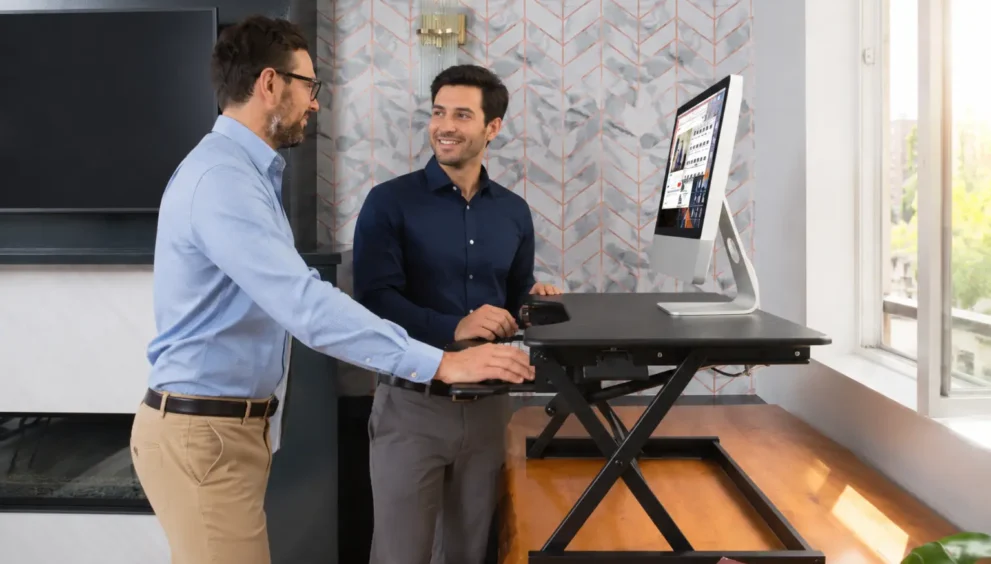
A riser desk is a platform that rests on top of a standard desk and raises your monitor, keyboard, and mouse to a standing height with the push of a lever or button. Unlike a full standing desk, which replaces your entire desk, a riser desk is an add-on unit — you keep the furniture you already own and simply adjust the surface height when you want to stand. Most models move up and down in seconds, so switching postures doesn’t interrupt your workflow or require you to unplug anything.
Because setup takes minutes and there’s no need for an electrician, a mounted bracket, or a total office overhaul, riser desks have become the entry point for people who are curious about sit-stand work but aren’t ready to commit to a full desk replacement.
Why Sitting All Day Works Against You
Before looking at what a riser desk adds, it helps to understand what a fully seated workday takes away. Spending eight or more hours in the same seated position keeps your body locked into one posture for almost the entire day. Your legs barely move, your shoulders round forward toward the keyboard, and your spine holds a static curve for hours at a stretch.
That stillness doesn’t just affect your body — it affects your attention span too. When you’re uncomfortable, part of your mental bandwidth is pulled toward managing that discomfort rather than staying on task. A stiff neck or an aching lower back becomes a background distraction that quietly chips away at your concentration, even if you don’t consciously notice it happening. As the day wears on, that low-level discomfort tends to compound, which is a big part of why so many people describe an afternoon slump that coffee alone can’t fix.
Benefits of Using a Riser Desk at Work
1. Sharper Focus Throughout the Day
Alternating between sitting and standing gives your body small, regular changes instead of one long static hold. That variation reduces the physical fidgeting and repositioning that comes from staying in one spot too long, which frees up more of your attention for the actual task in front of you. Many people who switch to a riser desk report that their focus holds up better into the late afternoon, a time when seated workers often feel their concentration drifting.
2. Higher Energy Levels
There’s a noticeable difference between the sluggishness of an all-day seated posture and the alertness that comes from being able to stand, shift your weight, and move a little while you work. Standing periodically keeps your body engaged rather than settled into stillness, and that engagement tends to translate into feeling more awake and present during meetings, calls, and deep-work blocks alike.
3. Better Posture and Alignment
When you’re seated for long stretches, it’s easy to slide into a slouched position without realizing it — shoulders forward, chin dropped toward the screen. Standing periodically encourages a more upright, neutral alignment: shoulders back, spine straighter, and your monitor closer to eye level when the riser is set correctly. Over time, consistent use builds better postural habits into both your sitting and standing routines.
4. Reduced Discomfort From Static Positioning
Holding any single position — seated or standing — for too long puts sustained load on the same muscles and joints. A riser desk breaks that pattern by making it effortless to change position throughout the day. Instead of staying locked into one posture from 9 to 5, you can shift every 30 to 60 minutes, which spreads the physical demand across different muscle groups rather than concentrating it in one place.
5. A More Dynamic, Engaged Workday
Small physical breaks — standing to take a call, adjusting the desk before a brainstorming session, stretching while reading an email — add texture to a day that would otherwise be one long stretch of stillness. That variety helps prevent the monotony that builds when every hour of your workday looks physically identical to the last.
6. Simple, Low-Cost Way to Upgrade Your Workspace
Compared to a full standing desk, a riser desk is a fraction of the cost and requires no assembly beyond placing it on your existing surface. For anyone testing whether a sit-stand routine fits their work style, it’s a low-risk way to find out before investing in a permanent setup.
7. Encourages More Movement Overall
Once standing becomes part of your normal routine, small movements — shifting weight, light stretching, a short walk between standing sessions — tend to follow naturally. A riser desk doesn’t force activity, but it lowers the barrier to it, which makes movement throughout the day feel like less of a deliberate interruption and more like a natural part of how you work.
How to Get the Most Out of Your Riser Desk
Owning a riser desk is only half the equation — how you use it determines whether you actually feel the benefits. Here’s how to build a routine that works.
- Find a rhythm that fits your day. Rather than standing for hours at a stretch, aim for a balanced pattern of sitting, standing, and short movement breaks throughout each 30-to-60-minute block. Standing all day is just as demanding on your legs and feet as sitting all day is on your back, so moderation matters more than maximum standing time.
- Set your monitor height correctly. The top of your screen should sit at or just below eye level whether you’re sitting or standing, so you’re not tilting your neck up or down to read it.
- Keep your elbows at roughly 90 degrees. Adjust your keyboard and mouse height so your wrists stay straight and your elbows form a natural right angle, in both postures.
- Invest in supportive footwear or an anti-fatigue mat. Standing on a hard floor for long periods without cushioning can make your feet tired faster, which discourages consistent use. A simple mat makes standing sessions far more comfortable.
- Ease into it. If you’re new to sit-stand work, start with shorter standing intervals and build up gradually rather than trying to stand for most of the day right away.
Choosing the Right Riser Desk for Your Setup
Not every riser desk fits every workspace, so a few practical factors are worth checking before you buy.
Desk depth and weight capacity. Measure your existing desk to make sure the riser fits comfortably, and check the weight limit against your monitor setup — dual-monitor users need a sturdier platform than single-screen setups.
Adjustment mechanism. Some risers use a manual lever, others use gas-spring or electric height adjustment. Manual levers are budget-friendly and reliable; electric models offer smoother, more precise height changes but cost more.
Keyboard tray design. A separate keyboard tier keeps your typing surface at a different height than your monitor, which helps maintain proper elbow and wrist alignment. Single-tier risers are simpler but offer less flexibility for ergonomic fine-tuning.
Stability at full height. A wobbly platform undermines the whole point of the upgrade. Look for models with a solid, stable feel when raised, especially if you tend to type with more force or gesture while on calls.
Riser Desk vs. Full Standing Desk
Both options accomplish the same core goal — giving you the ability to work standing up — but they take different paths to get there. A full standing desk replaces your existing furniture entirely, typically with an electric motor that raises and lowers the whole surface. It offers a cleaner, more integrated look and generally more stability at height, but it comes with a bigger price tag and often requires assembly or professional setup.
A riser desk, by contrast, works with the desk you already have. You lose a small amount of usable surface area since the platform sits on top of your existing workspace, but you gain a much lower entry cost, faster setup, and the flexibility to take it with you if you move offices or switch desks. For renters, remote workers who share a space, or anyone who isn’t ready to commit to new furniture, a riser desk is usually the more practical starting point. If you later decide sit-stand work suits you long-term, upgrading to a full standing desk becomes a much easier decision because you already know how it fits your routine.
Common Mistakes to Avoid
Even a well-chosen riser desk won’t deliver much benefit if it’s used incorrectly. A few missteps show up again and again:
- Standing too long, too soon. Jumping straight into hours of standing before your body adjusts often leads to sore feet and legs, which discourages continued use. Build up gradually instead.
- Ignoring monitor height. Raising the desk without also correcting your screen height forces your neck into an awkward angle, undoing much of the postural benefit.
- Skipping the anti-fatigue mat. Standing on a hard, unpadded floor for extended periods makes discomfort set in faster than it needs to.
- Treating it as an all-or-nothing switch. The benefit comes from alternating between positions, not from abandoning sitting altogether. A riser desk works best as a tool for variety, not a replacement for every seated hour of your day.
Final Thoughts
A riser desk is a small workspace change with an outsized effect on how your workday actually feels. By breaking up long stretches of sitting, it supports sharper focus, steadier energy, and better posture — without requiring a full office renovation or a big budget. The key is consistency: use it as a tool for regular movement throughout the day rather than a one-time upgrade you set once and forget. Paired with a few basic ergonomic habits, a riser desk can turn a static workday into one that feels noticeably more comfortable and productive from morning to close.
Frequently Asked Questions
Does a riser desk really improve focus?
A riser desk itself doesn’t automatically sharpen your concentration — what it does is reduce the physical discomfort and stiffness that come from sitting in one position for hours. By making it easy to shift posture regularly, it removes a common source of distraction, which in turn makes it easier to stay engaged with your work for longer stretches without losing momentum.
How often should I switch between sitting and standing?
There’s no single rule that works for everyone, but a common approach is to alternate every 30 to 60 minutes rather than standing for one long block. Pay attention to how your body feels and adjust the rhythm accordingly — the goal is regular variation, not maximizing standing time. Starting with shorter standing intervals and building up gradually tends to work best for beginners.
Will a riser desk fit any desk I already have?
Most riser desks are designed to sit on top of standard desks and work with a wide range of surface sizes, but it’s still worth measuring your desk’s depth and comparing it to the riser’s footprint before buying. Also check the platform’s weight capacity against your monitor and accessory setup, particularly if you run a dual-monitor arrangement.
Do I need a keyboard tray, or is a single-tier riser enough?
A separate keyboard tier helps keep your typing surface and monitor at independently correct heights, which supports better elbow and wrist alignment. If ergonomic fine-tuning matters to you, a two-tier design is worth the extra cost. If you mainly want a simple way to raise your monitor occasionally, a single-tier riser can still be a practical, lower-cost option.
Is standing all day at a riser desk a good idea?
Standing for an entire workday isn’t the goal — it can place just as much strain on your legs and feet as sitting all day places on your back. The most effective approach is a balanced routine that mixes sitting, standing, and short movement breaks throughout the day, rather than treating standing as a replacement for sitting rather than a complement to it.